Merry Tree Set Font Review: A Designer's Festive Test
There’s a specific moment in seasonal branding projects that’s both exciting and terrifying: opening a blank brand board for a holiday-themed client. You need something that instantly communicates festivity without relying on tired clichés. Recently, I faced this with a visual refresh for a local artisan bakery. Their holiday cookie boxes and café signage needed warmth and magic. After scrolling through countless sans-serif and script options, I decided to test something entirely different: the Merry Tree Set Dingbats Font.
What Merry Tree Set Is and How It Works in Real Design
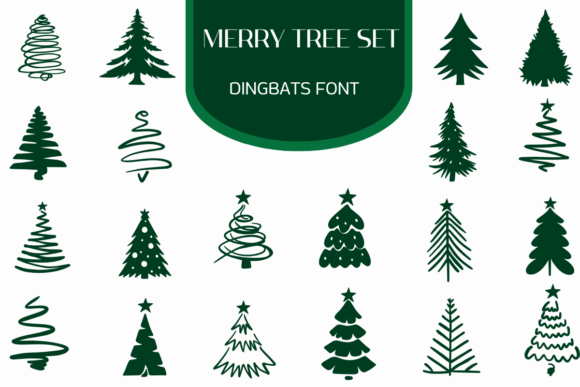
Merry Tree Set is not a traditional typeface. It’s a collection of Christmas tree silhouettes where each letter and number transforms into a unique, festive shape. This Dingbats font is essentially a set of illustrated icons masquerading as a typographic system. In practice, typing a word like "JOY" renders three distinct, charming tree illustrations. This fundamentally changes how you approach layout. I began my test by dropping "BAKERY" onto a logo concept draft. The result was a cluster of six little trees, each slightly different, forming a whimsical logotype. It immediately solved the "festive" requirement, bypassing the need for additional iconography or graphics.
The visual characteristics are clean, consistent, and filled with holiday spirit. The trees maintain a uniform silhouette style—they’re not overly detailed, which is key for scalability. The personality is playful yet elegant, evoking a hand-crafted, joyful mood. This makes Merry Tree Set ideal for brands that want to feel approachable and special, not corporate or generic.
Using Merry Tree Set Dingbats Font for Logo and Brand Identity Systems
For the bakery’s logo system, I used Merry Tree Set as the primary brand mark. It became the centerpiece of the brand board. The word "HOLIDAY" set in this font served as the main logo for their seasonal packaging line. On a business card mockup, the font’s clean lines printed sharply, even at a small size. The key here is understanding its role: Merry Tree Set is a display font, perfect for headlines, logos, and accent words. It’s not designed for body text. You cannot—and should not—try to set a paragraph with it. Its power is in immediate visual recognition and thematic setting.
In the brand identity, it influenced perception profoundly. The client’s audience instantly recognized the holiday association, and the consistent tree shapes across all assets—from the website header to the packaging label—created strong visual consistency. This isn’t just a font; it’s a ready-made graphic system. For a full identity, you’d pair it with a supportive, highly-readable serif or sans-serif font for all other copy, like menu descriptions or website body text.
Merry Tree Set on Packaging Mockups and Physical Materials
Seeing Merry Tree Set on a physical mockup is where its value crystallizes. I applied it to a cookie box template. The main product line name, "Frosted Forest," set in the Dingbats font, created an illustrated title that felt integrated into the design, not just typed on. On a shop sign mockup, the large-scale trees formed from letters like "OPEN" were clear and engaging from a distance. This font performs exceptionally well on physical items where decorative typography is welcomed: product labels, holiday posters, flyers, and limited-edition merchandise.
It’s crucial, however, to test readability. While clear at medium and large sizes, very small applications—like legal disclaimers on packaging—would be illegible and inappropriate. Merry Tree Set is best used for dominant, short phrases. It excels as a logo font and accent font, not a functional text font.
Integrating Merry Tree Set into Digital and Social Media Graphics
The transition to digital assets was seamless. For the bakery’s website hero section, a heading like "Seasonal Treats" in Merry Tree Set set the entire page’s tone. In social media graphics, particularly Instagram posts announcing new holiday items, the font became a reusable graphic element. Each post could feature a key word like "GINGERBREAD" or "DELIVERY" rendered as trees, creating a cohesive and recognizable social media layout without extra design work. This is a major efficiency win for busy designers and entrepreneurs.
Given that Merry Tree Set is a Dingbats font, its use in web design requires consideration. You’d typically implement it as a graphic or via a method that supports the specific font file format, ensuring those tree shapes render correctly across browsers. Its niche is festive commercial design assets for a distinct, time-limited period.
When to Avoid Merry Tree Set and Practical Testing Advice
Not every project is suitable for Merry Tree Set. Formal corporate branding, long editorial body text, any interface requiring continuous readability (like app UI), or projects needing a year-round typeface should avoid it. This is a specialty, seasonal tool. Its magic is in its specific festive spirit.
Before committing to using Merry Tree Set in final client work, my practical advice is to test it extensively in your mockups. Place it on every intended medium—the business card, the web banner, the product mockup—at the actual sizes you’ll use. Check how it pairs with your chosen supporting fonts. Since the description notes it includes letters and numbers, explore the full character set to ensure all needed glyphs are present and styled appropriately for your project.
A final, non-design note is paramount: always verify the commercial font licensing for Merry Tree Set. If you’re using it in client brand identity, packaging, templates, merchandise, or digital products, you must ensure your license permits that commercial use. This protects you and your client.
Ultimately, the Merry Tree Set Dingbats Font is a clever, versatile solution for injecting holiday spirit directly into your typography. It removes a design step by merging illustration with letterforms. For designers crafting festive branding, it’s not just a font; it’s a shortcut to cohesive, charming, and unmistakably merry visual identity.